Introduction
GCON4 Master File Loader (GCON4 MFL version 7.0) allow us to retrieve/update/insert master file attribute values (in multi-language), together with their relations, flexi-fields and document archive through ACT.
| Masterfile |
||||
|---|---|---|---|---|
| Attribute values (multi-language) |
Relations |
Standard information |
Flexi-fields |
Document Archive |
GCON4 MFL automatically creates the Excel templates to be uploaded to Unit4 Business Workplace (Unit4 ERP), which are based on Unit4 ERP master file configuration, considering the relations, flexi-fields, and document type that each master file contains.

Currently, GCON4 MFL can be used for the following master files for Unit4 ERP 7: GCON4 MFL can be also used to process the following procedures through the corresponding master files:
| Masterfiles |
||
|---|---|---|
| Account |
Personnel |
Rate Value Reference |
| Applicant |
Personnel Cost Distribution |
Requisitions |
| Assets |
Personnel Employment |
Roles |
| Attribute Value |
Personnel Work Schedule |
Sales order |
| Balance |
Position |
Stock Entry |
| Balance Value Reference |
Position/Role association |
Stock Withdrawal |
| Course |
Position Code |
Supplier |
| Course Event |
Posting GL |
Supplier Groups |
| Customer |
Posting AP |
Supplier Payment Recipients |
| Customer Groups |
Posting AR |
Training Need |
| Customer Payment Recipients |
Product |
Transaction Document Archive |
| Exchange Rate |
Product/Purchase price association |
Users |
| Goods received |
Projects |
Work Orders |
| Payment and Deduction |
Purchase order |
Work Schedule |
| Payment Dispatch |
Purchase order Amendment |
|
| Pay Scale |
Rate |
|
| Procedures |
|---|
| Position/Role association |
| Resource/Supplier association |
| Resource/Next of kin association |
| User/Resource association |
| User/Role association |
| User/Resource association |
| User/Client association |
| User defined attribute |
Additionally, through the master file Attributes that correspond to Attribute values, the following values can be treated:
| Description |
Att Desc |
Att ID |
Module |
|---|---|---|---|
| Relation group |
RELGRP |
GM |
CR |
| Currency types |
EXCHTYPE |
AZ |
CR |
| Posting groups |
POSTGRP |
AB |
CR |
| Journal ID |
REPJOURN |
K0 |
GL |
| Portfolio status |
PORTSTAP |
I3 |
AP-AR |
| Complain codes |
COMPLAIN |
AM |
AP-AR |
| Text types for invoice description |
TEXTTYPE |
G0 |
AP-AR |
| Payment status |
PAYSTAT |
GP |
AR |
| Collection agency |
COLLAGENT |
GH |
AR |
| Invoice history status codes |
FASTAT |
AA |
AP-AR |
| Portfolio status |
PORTSTAT |
G3 |
AR |
| Cheque status |
CHQSTAT |
GB |
AR |
| Depreciation books |
DEPRBOOK |
G11 |
AT |
| Posting types |
POSTTYPE |
G12 |
AT |
| Accountants |
ACCNO |
G1 |
CA |
| Transaction type |
ZTYPE |
I0 |
CA |
| Contract groups |
CON.GRP |
A9 |
CN |
| Contr. Type |
CON.TYPE |
A8 |
CN |
| Units |
UNITCODE |
AU |
CN |
| Budget proposal |
BUDPROP |
GC |
BU |
| Budget year |
BUDYEAR |
G6 |
BU |
| Scheme types |
SCHTYPE |
G8 |
FP |
| Statistical types |
STATTYPE |
GY |
AC |
| Day type variants |
DTVAR |
H1 |
TS-PS |
| Income categories |
INC.CAT |
B2 |
TS |
| Cost categories |
COST.CAT |
B3 |
TS |
| Resource connection |
CONNECT |
BC |
TS |
| Discipline |
DISCIP |
B5 |
TS |
| Resource types |
RESTYP |
C2 |
TS-PS-TT |
| Project types |
PRO.TYPE |
B4 |
TS |
| Resource groups |
RESGRP |
C6 |
TS-PS-TT |
| Job types |
JOBTYPE |
BH |
TS |
| Units |
UNIT |
BK |
TS |
| Rate codes |
RATE |
BP |
TS |
| Function type |
FUNCTYPE |
BR |
RR |
| Pay step |
PAYSTEP |
CS |
PR |
| Position authorization |
POSAUTH |
CR |
PR |
| Position code |
POSCODE |
CQ |
PR |
| Appointment type |
APPTYPE |
CV |
PR |
| Pay step |
PAYSTEP |
CS |
PR |
| Treatment code |
TRERULE |
CY |
PR |
| Course types |
COURSTYP |
IB |
TA |
| Next of kin codes |
FAMILY |
C3 |
PS |
| Transport types |
TRANSP |
CZ |
TT |
| Terms of delivery |
DELTERM |
D2 |
SO-PO |
| Modes of delivery |
DELMET |
D3 |
SO-PO |
| Invoicing amount limits |
AMNTLIM |
DH |
SO-UI |
| Initiator |
TASKSUPP |
DR |
SO-UI |
| Price method |
PRICEMET |
DJ |
SO-UI |
| Time pricing |
PRICETIM |
DN |
SO-UI |
| Price per year |
PRICEPER |
DO |
SO-UI |
| Property type |
PROPTYPE |
DP |
UI |
| Codes for price list groups |
PRICEGROUP |
D28 |
OS |
| Price list codes |
PRICECODE |
D14 |
OS |
| Add up codes |
ADDUP |
D32 |
OS |
| Event status codes |
EVENTSTAT |
D26 |
OS |
| Additional information groups |
SOCINFOGR |
D29 |
OA |
| Additional info rows |
SOCINFOGR |
D27 |
OA |
| Reason codes |
DIAGNOSIS |
D13 |
OS |
| Priority codes |
PRIO |
D15 |
OS |
| Action codes |
SERVACTION |
D12 |
OS |
| Area codes |
AREA |
D10 |
OA |
| SOC scheme codes |
SOCSCHEME |
D16 |
OA |
| SOC rule codes |
SOCRULE |
D17 |
OA |
| Index series |
INDEXESERIES |
D18 |
OA |
| Price types |
OAPRICE |
D21 |
OA |
| Geography |
GEOGRAPHY |
D22 |
OA |
| Object types |
OBJTYPE |
D24 |
OA |
| Cancellation codes |
CANCELCODE |
D33 |
OA |
| Reason codes for price changes |
CHGCODE |
D35 |
OA |
| Schedule groups |
SCHEDULEGR |
D37 |
OA |
| Message codes |
MSGCODE |
D34 |
EN |
GCON4 MFL can be used to extract data from Unit4 ERP, update data in Unit4 ERP or insert new data into Unit4 ERP.
GCON4 MFL can be used to INSERT new information or UPDATE existing data at the same time.
GCON4 MFL verifies that the data uploaded is correct. If there are any inconsistencies in the data, a detailed log describing the error is displayed.
Data Validation
Two levels of validation are performed when uploading information to Unit4 ERP using GCON4 MFL (Load button).
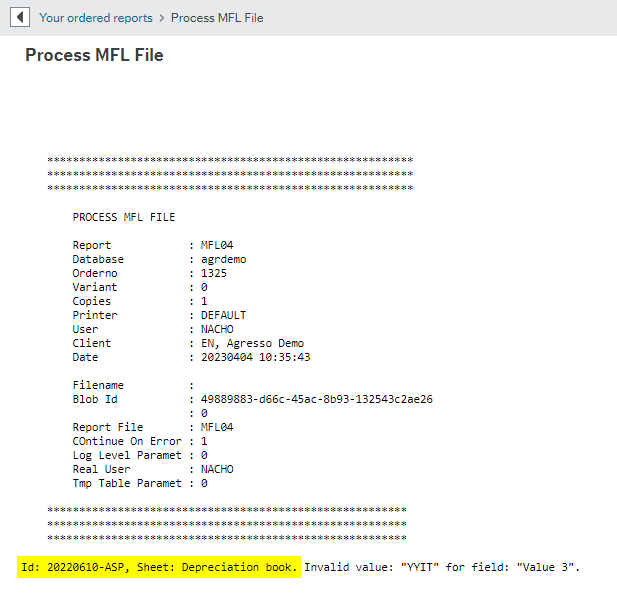
Level 1: GCON4 MFL validation is performed where common errors arise (i.e., non-existing attribute values, etc.).
If errors are encountered at this level, a detailed log is displayed by GCON4 MFL.
If no errors are found at this level, the full list of records populated in the Excel sheet is split into X number of batches, and the upload process starts.
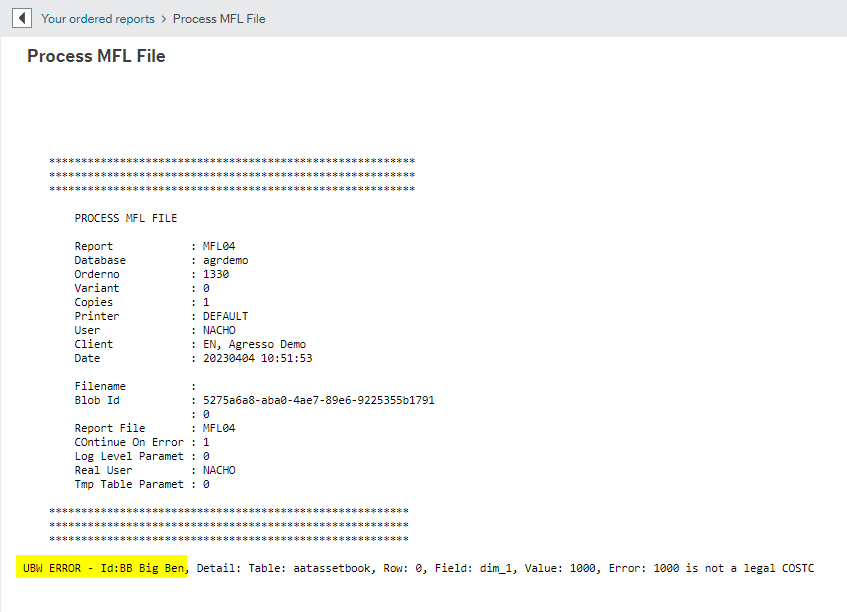
Level 2: At this level, a second, more specific validation is performed by Unit4 ERP (As when clicking on the save button in the Unit4 ERP window).
If errors are encountered, a log is displayed, which shows the error given by Unit4 ERP. The upload process is stopped and subsequent batches pending to be uploaded are not processed. Only previous batches without errors are uploaded successfully to Unit4 ERP.
If no errors are found, all batches are uploaded to Unit4 ERP.